


Dayforce
4.619.19K Reviews
App Specs
- Version
- 2026.9.0
- Updated On
- License
- Free
- Downloads
- 5,000,000+
- Developer
- Dayforce
- Categories
- Business
- Platform
- Android, iOS
Screenshots
 Analysis by AppCompare
For anyone whose work life is tied to changing shifts, a phone can be a useful place to keep track of the day. I approached Dayforce with that practical question in mind: does it help make work details easier to manage, and does it feel appropriate for information connected to a job? My view is that it can be useful when your employer uses it, but its value depends on how your workplace has set things up and how comfortable you are handling work tasks on a personal device.
Using Dayforce for the working day
I find Dayforce most useful when I treat it as a work-specific place to check what I need, rather than as a complete record of my day. In this section, I’m looking at the everyday choices that make a workplace app easier to trust: knowing which account is active, checking important details before acting, and keeping a backup routine for anything time-sensitive.
A work tool, not a general planner
Dayforce is a business app from Dayforce, designed around managing work life on the go. It is free to download, rated for Everyone, and has a 4.5 average from around 158,000 ratings. With more than 5 million installs, it is a familiar option for many workers, though those figures alone do not tell you whether it will suit your employer’s workflow. The important distinction is that this is not a replacement for a personal calendar or a general task manager: its usefulness is tied to workplace access and the tools your organization makes available.
That makes it most relevant to people who need to check work details away from a desk. If your employer uses the app, having schedule information on your phone can be more convenient than relying on a printed rota or digging through old messages. If you are looking for a standalone planner that works independently of a workplace account, this is probably the wrong fit. I would first confirm that your employer supports Dayforce and that you can sign in before treating it as a solution to a scheduling problem.
Trust starts with the account you use
Because the app connects to work, I think about trust differently than I would with a casual calendar. The practical question is not simply whether an interface looks polished; it is whether I understand which work details I am viewing and what I am choosing to do with them. Use your employer’s normal sign-in process, protect your phone with its usual screen lock, and avoid leaving an active work account open on a shared device. Those are sensible habits for any app that brings workplace information onto a personal screen.
I would also pause before enabling any optional phone access or alerts. Read each permission request in context and ask whether it supports something you actually intend to use. A request should not be accepted just because an app is work-related. Your organization may have its own policies for device use and account access, so it is worth checking those before relying on a personal phone for work tasks. I would not treat the presence of a workplace app as a reason to assume every setting is mandatory.
Keep schedule changes from becoming surprises
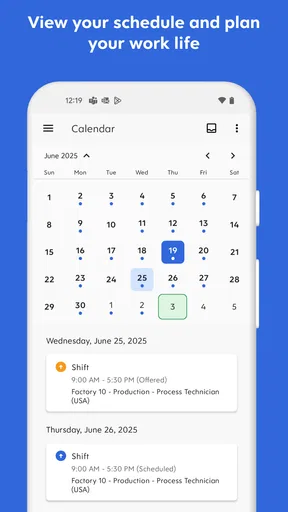
A schedule view is most valuable when it changes how you prepare for the day, not merely when you open it to confirm what you already know. One useful habit is to check the upcoming shift at a consistent point, such as when planning the next day, then check again if your workplace tells you that a change was made. This gives you a reliable routine without assuming every alert will arrive at exactly the right moment.
Worth Reading Before You Choose

EA SPORTS FC Mobile 26 Is a Bigger Football Game, but It Takes Time

Flipboard Shows What News Apps Must Do Beyond the Feed

Switching to Android Auto Means Rethinking Your Driving Routine

Google Calendar Makes a Crowded Week Easier to Manage

Ludo King Makes the Most of the Minutes Between Plans

Baby Panda World Brings Quick Play to Modern Phones, but Its Game Library Feels Busy
That caution matters because notifications can be delayed or missed, and a phone setting can also silence them. I would treat an alert as a convenience rather than the only source of truth when a shift change affects childcare, transport, or another commitment. If something looks out of date, refresh the schedule and use your workplace’s established way of confirming the change. That small backup step can prevent a notification issue from turning into a missed shift.
Clocking in calls for a little care
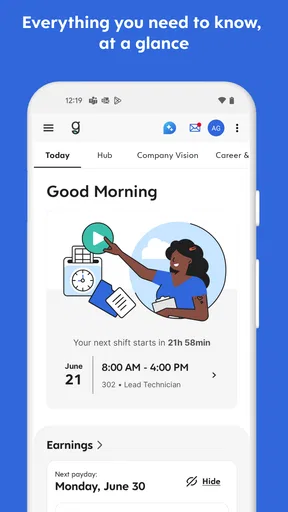
When a time-clock tool is available, the benefit is straightforward: it can make recording work time more convenient than relying on memory later. But a tap is still an important work action. I would build a simple routine around it—check that I am using the correct account, confirm the clock action has registered, and follow up through the workplace process if the app appears stuck. That is especially useful when arriving in a rush, when it is easy to assume a tap succeeded without checking.
There is a trade-off here. A phone-based clock can reduce friction, but it also makes connectivity, battery life, and the app’s responsiveness part of the workday. If the screen is slow or a confirmation is unclear, do not keep tapping blindly; check the displayed status and use the method your employer provides for reporting a missed or uncertain punch. This is a practical safeguard, not a reason to expect the app to replace your organization’s timekeeping rules.
Messages are convenient, but boundaries still matter
Having work conversations alongside schedule details can save time when coordinating a shift or asking a manager a focused question. I would use that convenience for short, work-related messages rather than assuming it should replace every communication channel. For urgent changes, follow whatever contact method your workplace says to use; an in-app message is not necessarily the same as a real-time conversation.
Keeping work messages on a phone also makes boundaries worth considering. Notifications can arrive outside the hours when you want to think about work, so review the phone’s notification settings and choose an arrangement that suits your role and workplace expectations. If you share a screen or show someone a notification, consider whether its preview displays details you would rather keep private. Small choices like those make a work app feel more manageable without requiring you to avoid it altogether.
Where it fits among other options
Compared with a paper rota, Dayforce can be easier to check while away from home and can bring schedule information and work actions into one place. Compared with a personal calendar, it is more closely connected to workplace tasks, but it should not automatically become the only calendar you use. I would copy or coordinate important commitments with the calendar that already helps you manage family, appointments, and travel—taking care not to create a second source of confusion if a shift changes.
For a worker whose employer already relies on Dayforce, using the workplace app is likely more practical than trying to track every change manually in a separate planner. For someone whose employer uses another system, a familiar calendar or that employer’s chosen tool will be the better option. A team manager may find work-related tools useful, but the app should not be assumed to provide every management function a team needs; the actual experience depends on the access and configuration supplied through work.
What the experience asks of you
The app has been available since September 15, 2011, and its current version is 2026.6.0, with a minimum operating-system requirement of 10. I see those details as practical checks before installing: make sure your device meets the requirement, and keep the app updated through your usual app-store process. An update can change how familiar screens behave, so if a task looks different, take a moment to verify what you are doing rather than rushing through a work action.
Some friction is still possible. Loading can feel slow when you need a schedule or message quickly, and notifications may not always arrive as promptly as you want. Those are meaningful drawbacks for a tool used around shift timing, even if they do not make it unusable. I would avoid depending on a single quick glance when a detail has real consequences, and I would make sure I know the workplace contact or procedure to use if the app is unavailable.
Dayforce is a sensible choice for workers who already have access through their employer and want a phone-based way to keep up with work details. It is less compelling if you want an independent organizer, dislike mixing work with your personal device, or need an alert system you can trust without checking. The app is free, but the account and workplace setup are central to whether it helps; downloading it alone does not make it a universal work planner.
My cautious recommendation is to try it if your organization uses it, then spend a little time checking your account, notification choices, and the process for handling schedule or time-clock problems. I would use it as a convenient window into work, while keeping a backup habit for anything that could affect when I need to show up or what hours are recorded. That balance lets the app save effort without asking you to hand over more trust than the situation warrants.
Ever find yourself juggling work schedules, personal events, and everything in between? I’ve been there, and that’s why I was intrigued when I stumbled upon Dayforce. This app promises to simplify workforce management, but does it deliver? Let’s dive into my experience with it.
First Impressions
So, I downloaded Dayforce onto my phone, and the first thing I noticed was its clean and straightforward interface. No flashy graphics or confusing menus—just a simple layout that gets the job done. It’s refreshing to see an app that doesn’t overcomplicate things, especially when it’s all about managing your time and work schedule.
Getting Started
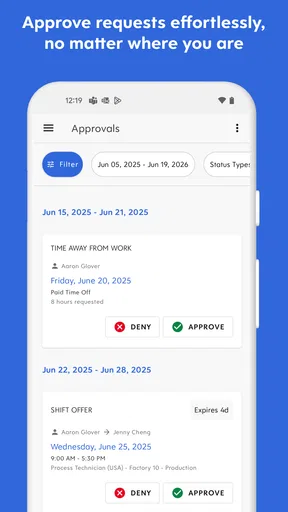
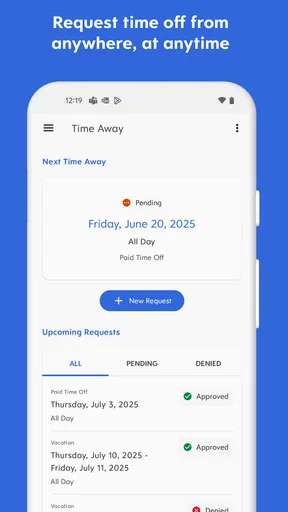
Setting up was a breeze. After entering some basic info and linking to my work account, I was ready to explore. The app provides a handy dashboard where you can see your schedule, clock in and out, and even request days off. It’s all right there, and it’s intuitive enough that even the least tech-savvy among us can navigate it without a hitch.
Features That Stand Out
One of the standout features for me is the real-time schedule updates. Let’s face it, life happens, and plans change. With Dayforce, any changes to my work schedule are instantly updated on my phone. No more checking and rechecking emails or waiting for a call from the boss.
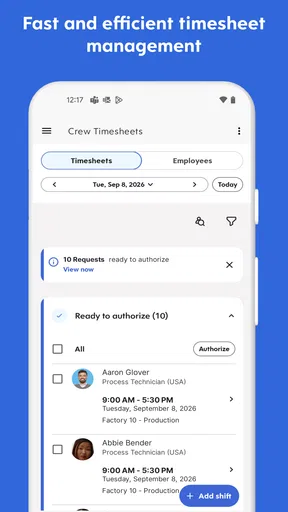
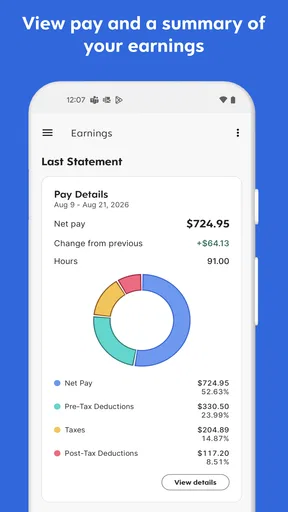
The time clock feature is another gem. Clocking in and out is as simple as tapping a button, and it even tracks your hours for payroll. It’s like having a personal assistant keeping tabs on your work time.
Communication Made Easy
Now, here’s something I didn’t expect: Dayforce also includes communication tools. You can send messages to your manager or coworkers directly through the app. This makes coordinating shifts or discussing schedules much more convenient. No more endless email threads or missed messages.
Room for Improvement
While I’ve had a mostly positive experience, there are a few areas where Dayforce could improve. For instance, the app occasionally lags when loading schedules or messages, which can be frustrating if you’re in a hurry. Also, the notification system could use some tweaking; there were times when I didn’t get alerts for schedule changes as promptly as I’d like.
That said, these are minor setbacks in an otherwise smooth experience. The developers seem committed to regular updates, so I’m hopeful these issues will be ironed out over time.
Final Thoughts
Overall, Dayforce is a robust tool for anyone looking to streamline their work life. It’s packed with features that make managing schedules and communicating with coworkers easier than ever. Despite a few hiccups, it’s a solid app that I’d recommend to anyone juggling multiple work responsibilities.
Whether you’re clocking in for the daily grind or managing a team of your own, Dayforce has something to offer. It’s one of those apps that you didn’t know you needed until you tried it. So, give it a whirl and see how it fits into your daily routine.
Pros
- User-friendly interface with intuitive navigation.
- Real-time updates enhance decision-making.
- Comprehensive payroll management tools.
- Customizable reports for detailed insights.
- Seamless integration with existing systems.
Cons
- Initial setup can be time-consuming.
- Mobile app lacks some desktop features.
- Occasional syncing issues reported.
- Limited offline functionality.
- Customer support response time varies.
FAQs for Dayforce
What is Dayforce used for?
Dayforce is a comprehensive human capital management (HCM) platform designed to help businesses manage their workforce. It integrates payroll, HR, talent management, workforce management, and benefits into a single platform, providing real-time data and analytics. This allows organizations to streamline operations and improve decision-making processes.
Is Dayforce compatible with both Android and iOS devices?
Yes, Dayforce is available for both Android and iOS devices. Users can download the app from the Google Play Store or the Apple App Store. The mobile version provides many of the same features as the desktop version, allowing for seamless management of HR tasks on the go.
How secure is my data with Dayforce?
Dayforce takes data security very seriously, employing advanced encryption methods and compliance with industry standards to protect user information. The platform regularly undergoes security audits and updates to ensure that sensitive data, such as employee records and payroll information, remains secure and confidential.
Can Dayforce be customized for my business needs?
Yes, Dayforce offers a high level of customization to suit varying business needs. Whether you’re a small startup or a large corporation, the platform can be tailored to fit your specific HR and workforce management requirements, ensuring you get the most out of its features and capabilities.
What kind of support is available for Dayforce users?
Dayforce provides robust support options, including 24/7 customer service, comprehensive online resources, and a community forum. Users can access detailed guides and tutorials directly within the app, and reach out to support teams via phone or email for personalized assistance.


